
To toggle between Eco Mode and Turbo Boost Mode on most smart screen vapes, locate the physical switch or button, typically found at the base or side of the device. Slide the switch or press the button to shift from the lower-wattage “Eco” or “Regular” setting to the high-wattage “Turbo” or “Pulse” setting. The built-in LED smart screen will immediately update to display a unique animation, the current mode, and the adjusted battery and e-liquid percentages.
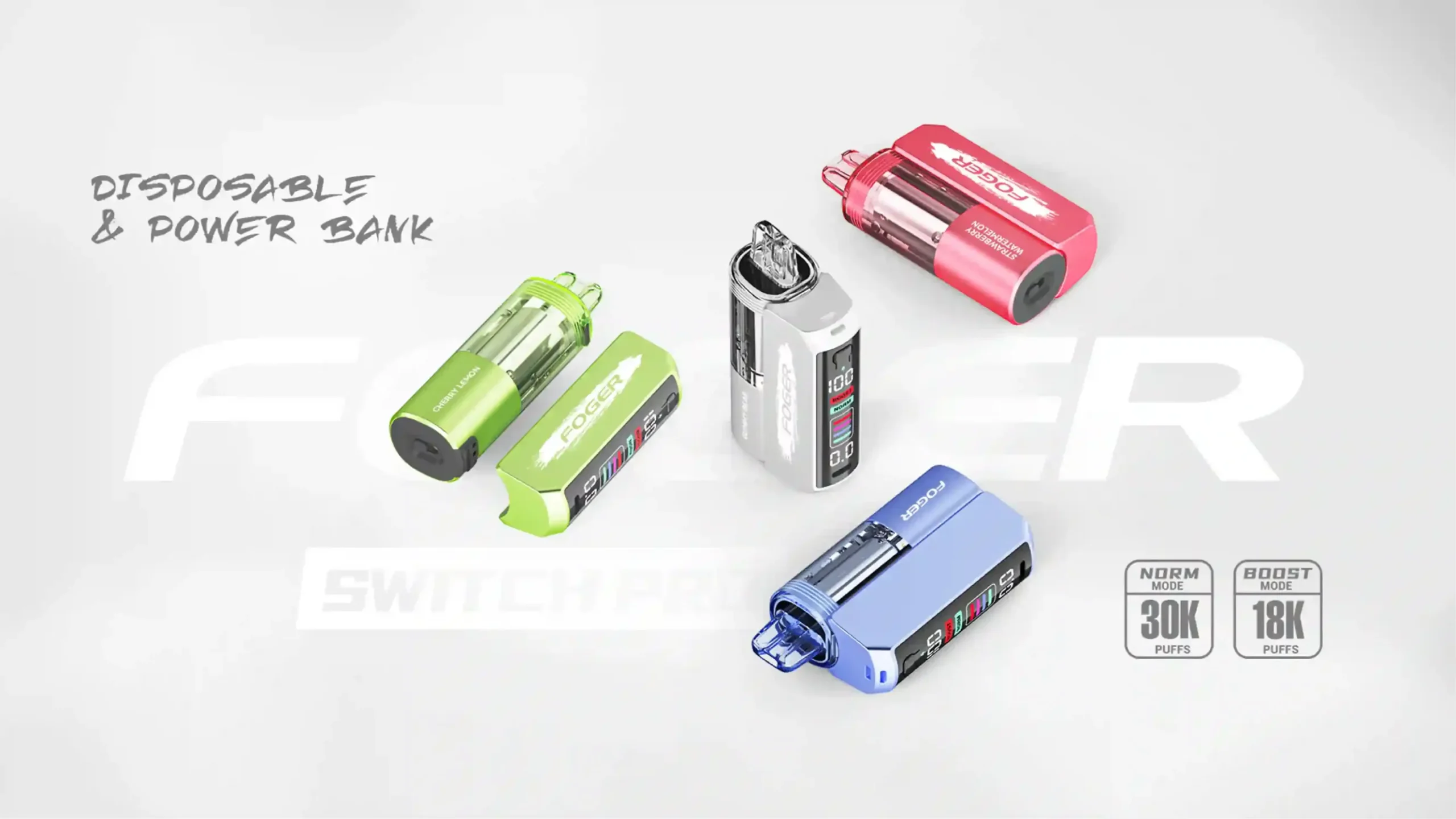
The landscape of disposable vaping has evolved rapidly. We are no longer limited to simple draw-activated sticks; today’s smart screen vapes are sophisticated pieces of hardware featuring digital displays, battery monitors, and adjustable output settings. For vapers looking to customize their nicotine delivery and flavor intensity, understanding how to manipulate these settings is crucial. This comprehensive guide from the editorial team at Vaperoster will break down exactly how to operate these devices, the mechanical differences between the modes, and how to optimize your daily vaping experience.
What Are Smart Screen Vapes and Why Do Their Modes Matter?
A smart screen vape is a modern disposable or pod system equipped with an LED or OLED display. These screens provide real-time data regarding your device’s vital statistics, eliminating the guesswork associated with older models. You no longer have to wonder when your battery will die or when you will experience a dry hit.
The inclusion of different operational modes—most commonly labeled as Eco Mode (or Regular Mode) and Turbo Boost Mode (or Pulse Mode)—allows the user to dictate how the device utilizes its internal battery and e-liquid reservoir. By toggling these modes, you are physically altering the electrical current sent to the heating element. This directly impacts throat hit, vapor production, and the overall lifespan of the device. Understanding this functionality allows you to stretch your budget further or indulge in a richer flavor profile on demand.
How Do You Switch Between Eco and Turbo Boost Modes?
Manufacturers have designed these systems to be intuitive, but the exact mechanism varies by brand. Here are the three primary methods you will encounter when handling contemporary smart devices.
Method 1: The Bottom Slider Switch Mechanism
The most common toggle mechanism is the physical slider, usually located directly on the bottom of the device near the Type-C charging port.
- Step 1: Locate the sliding switch at the base of your vape.
- Step 2: To activate Eco Mode, push the slider to the middle position (or the side marked with a single circle/minus sign). The screen will confirm the selection.
- Step 3: To activate Turbo Boost Mode, push the slider all the way to the side marked with a lightning bolt, double circle, or “Pulse” icon. You will feel a tactile click, and the screen will flash a dynamic animation.
- Step 4: To turn the device off completely (if supported) or lock it, slide the switch to the “Close” or “Lock” icon.
Method 2: The Push-Button Interface
Some devices utilize a tactile button mounted on the side or the front faceplate below the screen. This is common in slightly larger box-style disposables.
To switch modes using a push-button, you generally need to press the button twice in rapid succession. The screen will display the change from a standard wattage output to a boosted output. A single press usually illuminates the screen to check battery life without firing the coil, while a long press might turn the device on or off depending on the manufacturer’s chipset programming.
Method 3: Touch Screen Controls on Advanced Disposables
As technology progresses, high-end models are introducing capacitive touch screens. On these devices, toggling modes requires a simple tap. You will swipe to unlock the screen and tap the specific icon representing your desired mode. The haptic feedback engine inside the device will vibrate slightly to confirm the mode transition.
What Exactly is Eco Mode on a Vape?
Eco Mode, sometimes referred to as Regular or Standard Mode, is the default operational state of most smart vapes. It is designed for endurance, consistency, and a smoother draw.
The Mechanics Behind Battery Conservation
When your device is set to Eco Mode, the internal chipset restricts the wattage output. If the device contains a dual-mesh coil setup, Eco Mode typically only fires one of the two coils, or it fires both at a significantly reduced voltage (usually between 10W and 12W). This lower power draw places less strain on the lithium-ion battery, drastically slowing the rate of discharge. Consequently, the e-liquid is vaporized at a slower, more deliberate pace.
When Should You Utilize Eco Mode?
Eco Mode is highly recommended for everyday use. If you are away from a charger for an extended period, keeping your device in this state ensures it will last through the day. Additionally, vapers who prefer a cooler, less aggressive throat hit, or those vaping high-strength nicotine salts, will find Eco Mode provides a much more comfortable and balanced experience.
How Does Turbo Boost Mode Enhance Your Vaping Experience?
Turbo Boost Mode is designed for maximum performance. It is the setting you choose when you want the most robust flavor and the largest clouds your device can produce.
Understanding Dual-Mesh Coil Activation
Activating Boost Mode tells the device’s microchip to open the floodgates. In smart vapes equipped with dual-mesh coils, this setting fires both coils simultaneously at a higher wattage (often peaking between 20W and 24W). The surface area heating the e-liquid is doubled, and the temperature is increased. This rapid vaporization creates a dense, warm cloud that carries an intense concentration of flavor notes.
The Trade-off: Cloud Production vs. E-Liquid Consumption
The enhanced performance of Boost Mode comes with a significant trade-off. Firing dual coils at high wattage burns through both your battery life and your e-liquid capacity at an accelerated rate. A disposable vape advertised to deliver 15,000 puffs in Eco Mode will typically only deliver around 7,500 puffs if used exclusively in Turbo Boost Mode. It is best used sparingly—perhaps after a meal or when you are craving a stronger nicotine hit.
Eco Mode vs. Turbo Boost Mode: Which Should You Choose?
To help you decide which setting aligns with your vaping style, we have compiled a comparative breakdown of the two modes.
| Feature / Metric | Eco Mode (Regular) | Turbo Boost Mode (Pulse/Boost) |
|---|---|---|
| Coil Activation | Single Coil / Low Wattage | Dual Coil / High Wattage |
| Vapor Production | Moderate, stealthy clouds | Dense, massive clouds |
| Flavor Intensity | Smooth, balanced | Rich, aggressive, and warm |
| Battery Drain | Slow and efficient | Rapid discharge |
| E-Liquid Consumption | Standard (Maximizes puff count) | High (Halves the total puff count) |
| Screen Animation | Minimalist or static display | Dynamic, flashy graphics (e.g., rockets, lightning) |
Which Popular Smart Screen Vapes Feature Dual Modes?
If you are looking to purchase a device with these capabilities, several industry-leading brands have mastered the dual-mode technology. Here are a few notable examples you can find in the Vaperoster catalog.
Navigating the Geek Bar Pulse Series
The Geek Bar Pulse is arguably the device that popularized the dual-mode trend. It features a tactile slider on the bottom. Sliding it to “Regular” provides a smooth 15,000 puffs, while clicking it over to “Pulse” unleashes 7,500 puffs of intense flavor, accompanied by a rocket ship animation on its full-sized LED screen.
Mastering the Raz TN9000 Interface
The Raz TN9000 offers a slightly different take with a highly detailed, retro-futuristic digital screen. The airflow and mode adjustments are deeply integrated, allowing users to fine-tune their draw restriction while simultaneously boosting the wattage output for a heavily customized throat hit.
Exploring the Spaceman Prism 20K
Taking it a step further, the Spaceman Prism 20K offers three modes instead of two: Soft (15W), Norm (18W), and Boost (20W). It utilizes a button-press mechanism to cycle through the power options, catering to vapers who want a middle ground between basic economy and full-throttle power.
Does Switching Modes Affect Coil Longevity and Flavor Profile?
Yes, drastically. The mode you select has a direct impact on the physical integrity of the atomizer.
When you vape exclusively in Turbo Boost mode, the extreme heat can cause the cotton wicking material to degrade faster. If you chain-vape in this mode, the cotton may not have enough time to re-saturate with e-liquid between puffs, leading to a burnt taste. Conversely, relying on Eco Mode preserves the cotton and the coil wire, ensuring that the flavor profile remains crisp and authentic from the first puff to the last drop of e-liquid.
How to Troubleshoot Unresponsive Mode Switches on Your Device?
Occasionally, you may slide the switch or press the button, but the screen does not register the change. If your smart vape is stuck in one mode, try these troubleshooting steps:
- Clean the slider track: Pocket lint and dust can get trapped in the bottom slider track. Use a toothpick or a dry cotton swab to gently clear debris away from the switch.
- Check the battery level: Many smart vapes are programmed with a safety override. If your battery drops below 15% or 20%, the device will automatically lock out Turbo Boost Mode to conserve enough power to vaporize the remaining e-liquid. Plug the device in via a Type-C cable and let it charge to 100%.
- Perform a soft reset: If the device has a button, click it rapidly five times. If it uses a slider, move it back and forth from “Close” to “Boost” a few times to reset the internal contact sensors.
E-E-A-T Expert Corner: Maximizing Your Smart Vape’s Lifespan
As professionals in the vaping industry, the team at Vaperoster advises against leaving your device in Boost Mode perpetually. To get the maximum value and the best flavor consistency, we recommend the “80/20 Rule.”
Keep your device in Eco Mode for 80% of your daily usage. This ensures consistent nicotine delivery and preserves your battery health. Reserve Turbo Boost Mode for the remaining 20%—specifically for moments when you want a highly concentrated flavor burst or a warmer draw. Furthermore, always unplug your device as soon as the screen indicates a 100% charge to prevent battery degradation, which can negatively affect the performance of Boost Mode.
Frequently Asked Questions (FAQs) About Smart Vape Modes
Q: Will using Turbo Boost Mode make my vape run out of juice faster?
A: Yes. Because Turbo Boost mode activates dual-mesh coils at a higher wattage, it vaporizes roughly twice as much e-liquid per puff compared to Eco Mode. Your total puff count will essentially be cut in half.
Q: Can I switch modes while taking a puff?
A: It is highly recommended that you remove the device from your mouth and stop inhaling before toggling the switch. Changing the electrical current while the coil is actively firing can confuse the chipset and potentially cause a misfire.
Q: Why does my vape taste burnt only when I switch to Boost Mode?
A: Boost Mode requires the wicking cotton to be fully saturated to handle the high heat. If your e-liquid levels are low (under 15%), or if you are chain-vaping too quickly, the cotton dries out, resulting in a burnt taste at high wattages.
Upgrade Your Vaping Experience with Vaperoster
Mastering the settings on your smart screen vape transforms a standard nicotine habit into a highly customizable experience. Whether you prioritize the longevity and smoothness of Eco Mode or the intense, cloud-chasing thrill of Turbo Boost Mode, modern disposable technology puts the power entirely in your hands.
Ready to experience the latest dual-mode technology for yourself? Visit Vaperoster.com today to explore our curated selection of premium smart screen vapes. From the legendary Geek Bar Pulse to the cutting-edge Raz TN9000, we stock the industry’s most reliable and flavorful devices. Elevate your vape game with Vaperoster—your trusted source for authentic vaping hardware.